One control plane, one agent per server, databases that don’t depend on either
ElastiCluster has two moving parts: a control plane that you run as a single container, and a small agent on each
Linux server. The databases themselves run as containers on your servers and keep running whatever happens to
either part.
Illustration of the planned architecture.Management: plans, status, metricsData: client traffic, replication, backups
The control plane
One container holds the web console, the REST API, a certificate authority, an encrypted vault and its own
SQLite database; that much works in development builds today. The planner, policies and operation runner are
being built now, and the MCP server for AI assistants, metrics and alerting join in v0.3. It runs as a non-root user on a read-only filesystem, listens on port 8443 for people and
tools and on port 9443 for agents, and keeps all its state on one data volume.
It is a single active instance by design. Availability comes from restarting quickly, regular self-snapshots and,
planned for v0.8, continuous replication of its database and a fenced warm standby.
Planned control-plane sizing
Fleet
CPU
Memory
Disk
Evaluation, up to 5 servers
1 vCPU
2 GB
20 GB
Up to 50 servers
2 vCPU
4 GB
50 GB
Up to 150 servers
4 vCPU
8 GB
100 GB
Up to 500 servers
8 vCPU
16 GB
200 GB SSD
The agent
ecl-agent runs on every managed server, as a container by default or as a binary under systemd. It
dials out to the control plane over mutual TLS, so servers need no inbound management port and can sit behind
NAT. It receives signed, declarative plans for the server and for each cluster member on it, applies them, checks
the result and reports back. If something drifts, sending the same plan again repairs it.
The agent prepares the host (Docker, kernel settings, time sync, mounts), runs preflight checks, collects metrics
and logs, and updates itself from signed releases without restarting any database. Its design budget is under
40 MB of memory and under 1% of one CPU.
The databases
Each engine runs as containers pinned by digest from a signed catalog of tested versions, with its own proven
high-availability tooling: Patroni and etcd, replica-set elections, Sentinel, Galera or Garage’s replication.
HAProxy and an optional keepalived virtual IP give applications endpoints that follow the primary. Uninstalling
the agent leaves the databases running as plain containers.
What keeps working when something fails
The control plane is not in the data path, so most failures affect what you can change, not what your applications
can read and write.
The control plane is down
Databases, failover, endpoints and log archiving keep running. Scheduled backups and drills wait; operations resume where they stopped.
An agent is down
The databases on that server keep running. The server shows as unreachable and operations on it pause.
A server is down
The engine’s own high-availability manager fails over. Operations pause and offer choices.
A data disk is missing at boot
The database refuses to start on the empty mount point instead of starting fresh.
The backup repository is unreachable
Logs queue on the servers and the database stays up; a critical alert fires.
The control plane’s own data is lost
The databases are unaffected. Restoring the control plane enters a review mode that blocks changes until an admin confirms the fleet’s state.
From install to first cluster
01
Start the control plane
Run the container with Docker Compose and open the console. A one-time setup token from the server lets you create the owner account with two-factor sign-in and the first project.
Working in development builds
02
Add servers
Over SSH from the console, or with a one-line install and a join token. Preflight checks run and the server waits for approval.
Working in development builds
03
Set policies
Projects come with production, staging and development environments, each with approval rules, AI limits and backup requirements.
In development now
04
Create a cluster
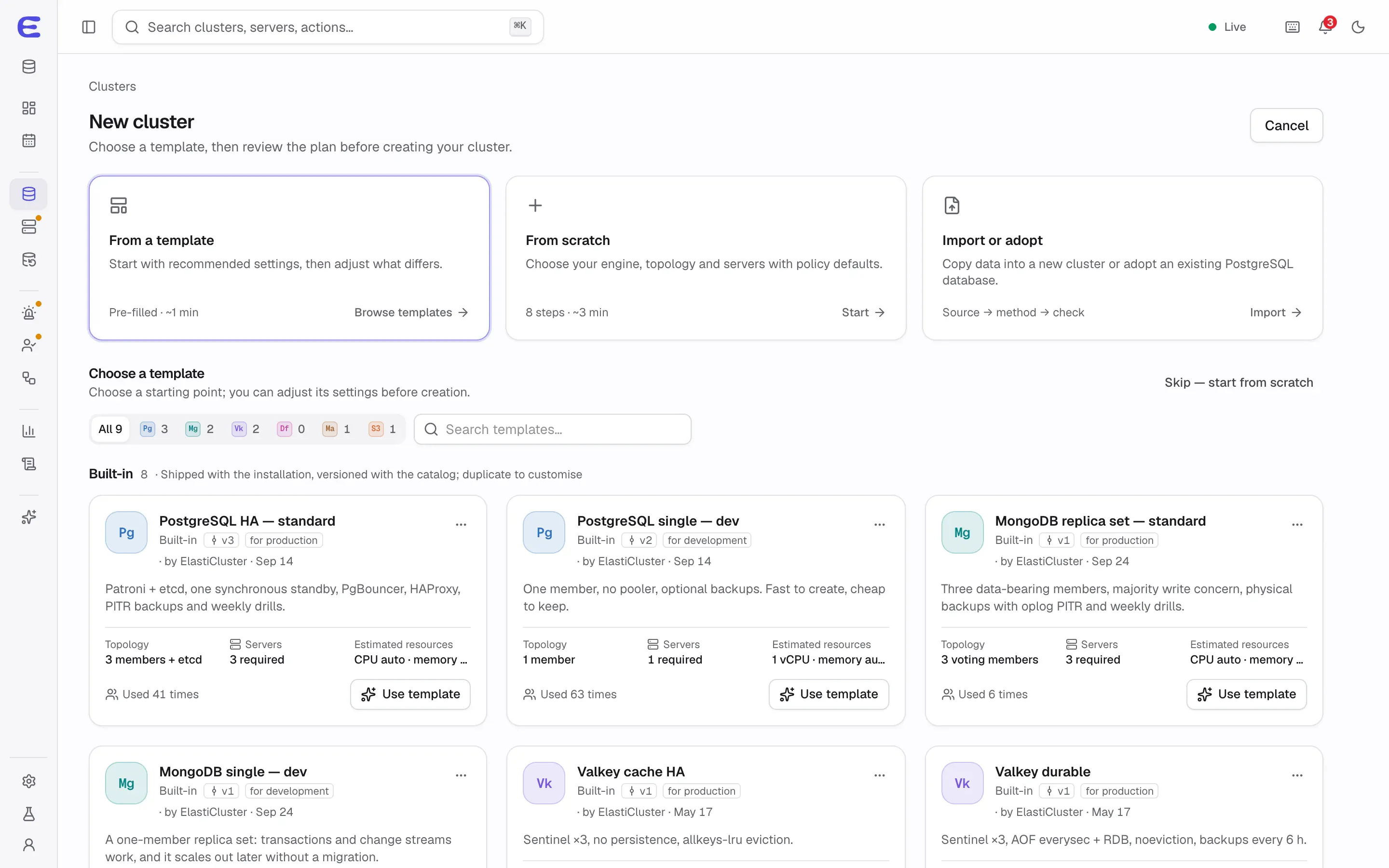
Pick a template and servers, review the plan, apply it, then connect your application to the endpoint.
Planned for v0.1
Creating a cluster from a template; every option ends in a plan you review.Interactive demo, simulated data.
Open this screen in the demo
Ways to run it
Docker Compose with the reference file is how development builds start the control plane today.
A one-line installer for online and offline installs is planned for v0.8. Until it exists,
ElastiCluster has no public download.
Lab mode, planned for v0.1, runs the control plane and three practice servers on one machine,
including a laptop with Docker Desktop or OrbStack, to try a highly available PostgreSQL cluster. It shows the
behaviour, not real availability.
Air-gapped networks and HTTP proxies: offline bundles and proxy support are planned for v0.8.
Upgrading the control plane
An upgrade takes a self-snapshot, migrates the database and commits automatically after 30 healthy minutes, with a
rollback command until then. Agents upgrade only after the control plane has committed, and a control-plane
upgrade never changes your clusters by itself: newer configuration templates reach each cluster as a plan you
review.
Scale
The design targets for one control plane are about 500 servers, 300 clusters and 50 people in the console. Larger
fleets, or longer metric history, send metrics to an external Prometheus-compatible store.
What it doesn’t do
Creating cloud VMs, running on Kubernetes, sharding PostgreSQL, synchronous clusters across regions, Windows
servers and schema migrations are outside v1.0. Cloud providers such as Hetzner, AWS and GCP, and a Kubernetes
runtime, are planned after v1.0.
The interactive demo runs the whole console on simulated data. Trigger a failover, approve an AI assistant’s
plan, restore a backup to a point in time. Nothing to install.