A backup only counts once it has been restored. ElastiCluster turns backups on by default, encrypts them, lets you
recover to a point in time into a new cluster, and restores them on a schedule to prove they work, reporting how
long the restore took.
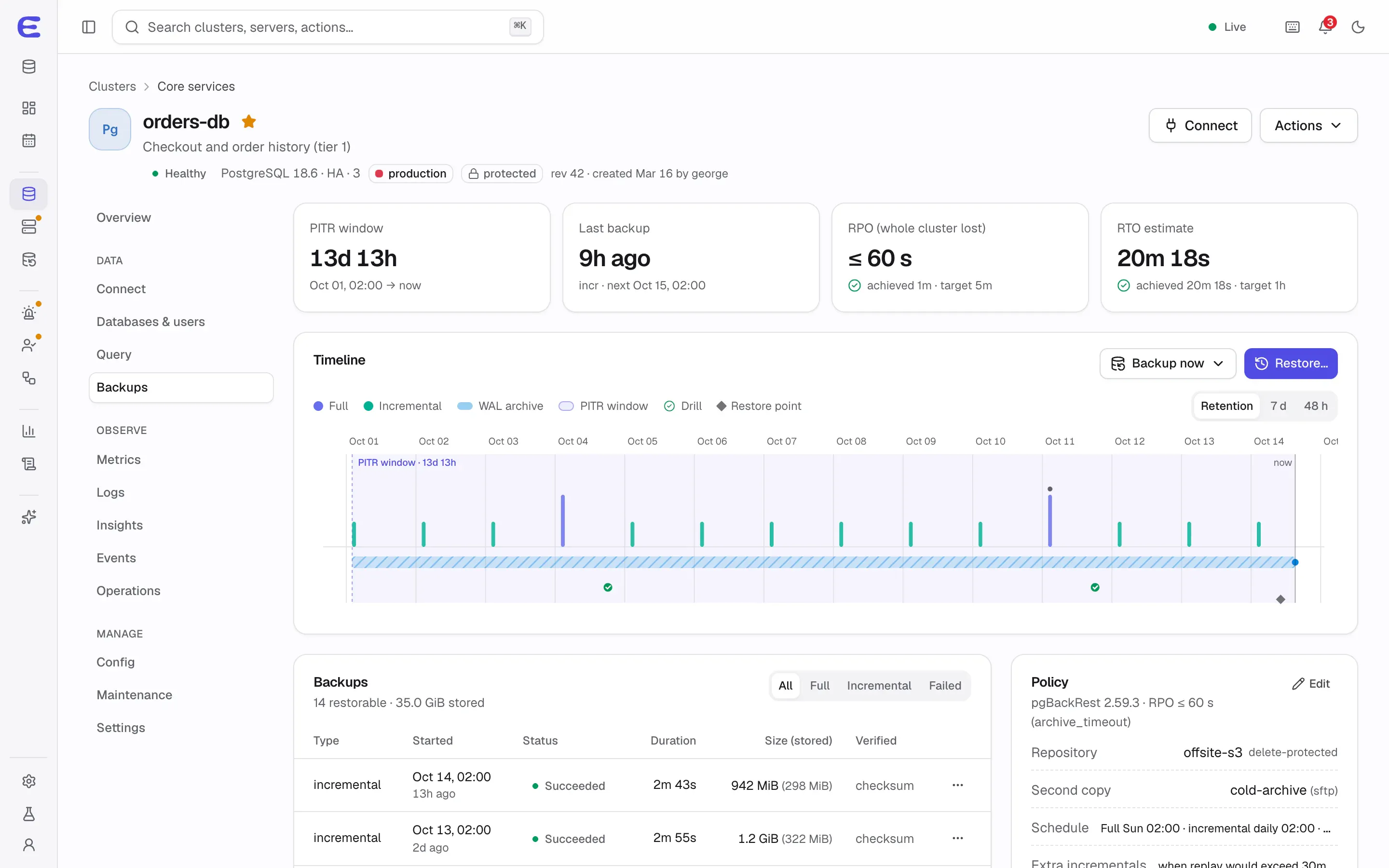
orders-db’s backups: the point-in-time window, timeline, policy and estimated restore time.Interactive demo, simulated data.
Open this screen in the demo
Safe defaults
On by default for every cluster outside development, with a schedule set by the template.
Encrypted by default. For MongoDB, MariaDB, Valkey and Dragonfly, servers hold only a public key, so a compromised server cannot read older backups; PostgreSQL uses pgBackRest’s repository encryption.
Restore to a new cluster by default. Production stays untouched while you check the restored data.
Bulk data never passes through the control plane; it goes straight from the servers to the repository.
Standard tools and formats, with documented manual restores that work without ElastiCluster.
Methods per engine
Engine
Method
Default schedule
Point-in-time recovery
PostgreSQL
pgBackRest (WAL-G planned for v0.7)
Full weekly, incremental daily, plus extra incrementals when WAL piles up
Yes, continuous WAL archiving
MongoDB
Physical hot backups
Full weekly, incremental daily
Yes, oplog archiving
MariaDB
mariadb-backup
Full weekly, incremental daily
Yes, binlog archiving
Valkey, Dragonfly
Snapshots taken on a replica
Every 6 hours, kept 7 days
No
Garage S3
Encrypted bucket mirrors
Daily
No
Point-in-time recovery
Pick a moment inside the recovery window, seven days by default, and ElastiCluster restores the latest backup
before it and replays the log up to that point. PostgreSQL can also stop at a transaction, a log position or a
named restore point; MongoDB at an oplog timestamp; MariaDB at a GTID.
Before risky operations, such as configuration changes, upgrades or dropping data, a restore point is created
automatically. “Restore to just before this operation” then works without guessing clock times.
A restore or fork can never write into the source cluster’s archive, so experimenting with a copy cannot damage
the original’s recovery history. An in-place restore exists for emergencies, as a critical plan with typed
confirmation and an optional safety backup first.
Forks
A fork is the latest backup restored into a new cluster that deletes itself after seven days unless you extend
it. Use one to test an upgrade, reproduce a bug or give an analyst a copy.
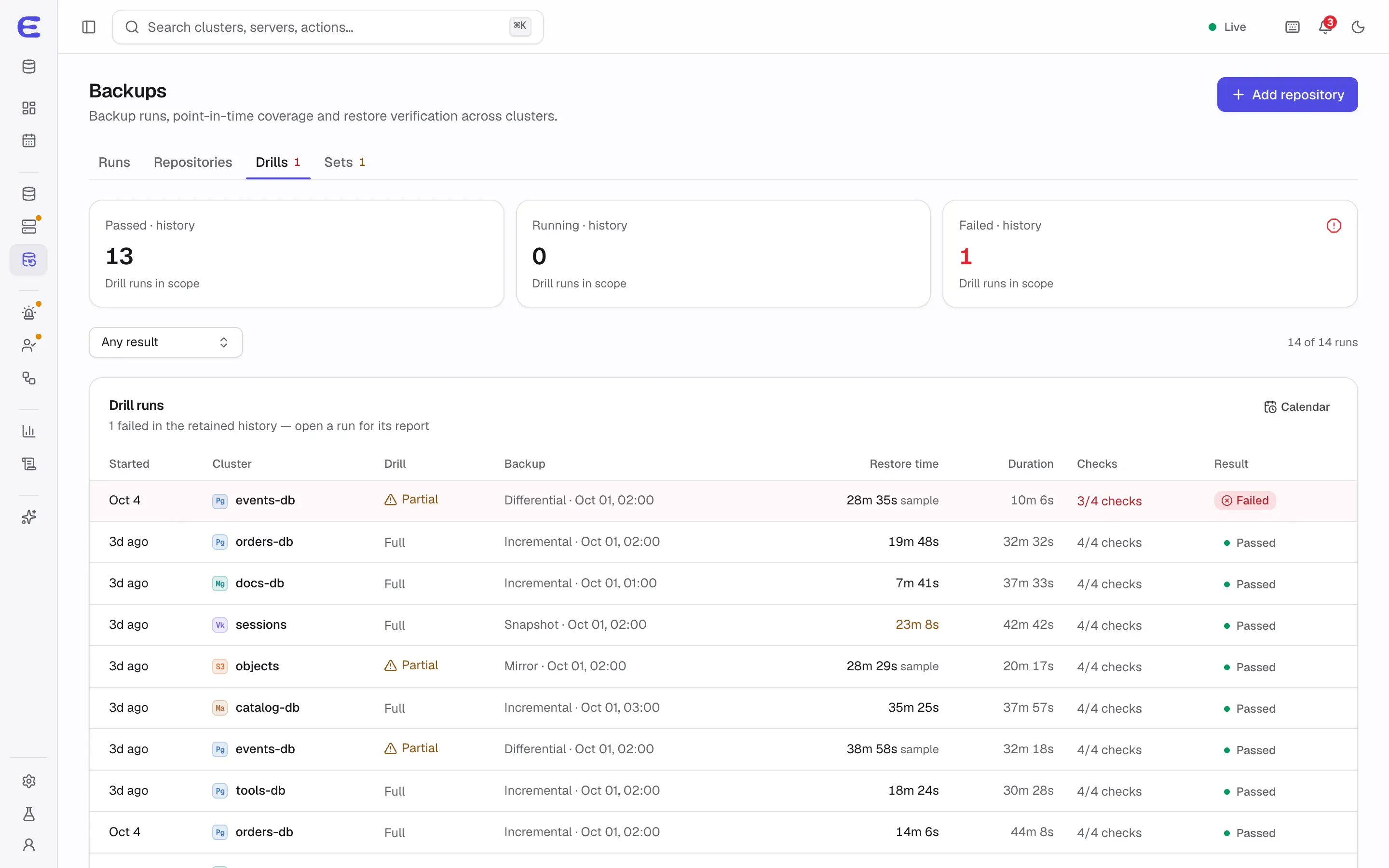
Restore drills
A drill restores a backup into throwaway containers on a server set aside for it, runs checks and throws the
copy away. Production clusters are drilled weekly, others monthly. Checks include an integrity sample with
pg_amcheck for PostgreSQL, document counts and validation for MongoDB, key counts for Valkey, and SQL
assertions you write yourself.
Each drill records how long the restore and the log replay took, which turns your recovery-time estimate into a
measurement. If the drill server is too small for a full restore, the drill checks the latest full backup and a
sample of databases and is reported as partial; production needs full drills or a recorded exception. An alert
fires when a drill is overdue.
Restore drills across clusters, each with its measured restore time and checks.Interactive demo, simulated data.
Open this screen in the demo
Repositories you can trust
Backups go to S3-compatible storage (AWS S3, Cloudflare R2, Backblaze B2, Wasabi, Hetzner, Scaleway, OVH or a
Garage cluster you run with ElastiCluster), to a filesystem such as NFS, or over SFTP. Google Cloud Storage and
Azure are planned for v0.7.
A Test button checks a repository end to end, including that a server’s credentials cannot
delete old backup versions.
Object Lock and least privilege: servers get credentials that cannot destroy history. For
most engines, only a short-lived maintenance job holds delete rights; PostgreSQL servers can delete but not
remove object versions, on a versioned bucket with Object Lock.
Signed manifests: each backup’s manifest is signed by the control plane, so a tampered or
overwritten backup is rejected at restore time.
A second copy on an immutable repository is required for production when the first one cannot
block deletion, planned for v0.7.
Retention never deletes the last successful full backup of a cluster that still exists, and
pinned backups are kept until you unpin them.
When everything else is gone
A recovery kit, encrypted with a passphrase you choose, holds the repository locations, keys and the key that
verifies backup signatures. With it, backups stay restorable even if the control plane and its master key are
lost. Manual restores with the engines’ own tools are tested on every release.
When a cluster is deleted, its backups stay available for 30 days and can be restored into a new cluster by ID.
Disaster recovery for PostgreSQL
A standby cluster in another site can follow the primary cluster by streaming or by replaying its archive.
Switching sites is a planned, lossless operation; promoting the standby after a disaster requires proof that the
old site can no longer accept writes. Delayed replicas that trail by a set time, for recovering from a mistaken
DROP TABLE, are planned alongside, in v0.7.
Status
Backups, point-in-time recovery, restores and drills for PostgreSQL are planned for v0.2,
followed by each engine as it arrives. In the demo, open
orders-db’s Backups tab and choose Restore to walk through a point-in-time restore into a new cluster.
The interactive demo runs the whole console on simulated data. Trigger a failover, approve an AI assistant’s
plan, restore a backup to a point in time. Nothing to install.