Skip to content
Planned for v0.6

S3-compatible object storage on your own servers

Garage clusters keep three copies of every object across nodes and zones, with buckets, access keys and an object browser in the console, encrypted mirror backups, and one click to use the cluster as the backup repository for your databases.
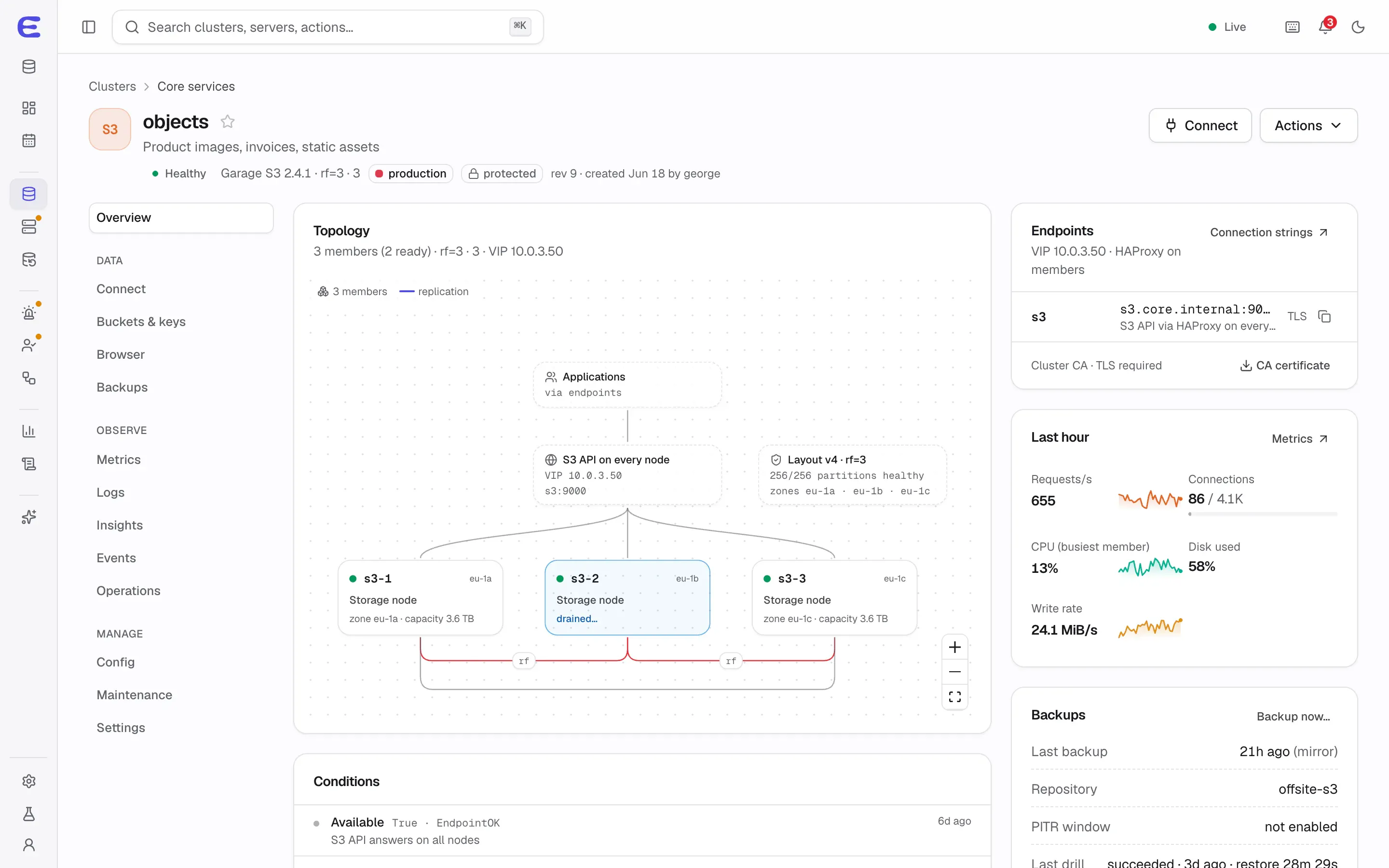
objects, a Garage 2.4.1 cluster with replication factor 3 on three storage nodes: an S3 API on every node behind a virtual IP, a layout with three zones, one node drained for patching, and the S3 endpoint and metrics on the side.
objects, a three-node Garage cluster, with one node drained for patching. Interactive demo, simulated data. Open this screen in the demo

Why Garage

Garage is a lightweight, S3-compatible object store designed to run on ordinary servers spread across sites. ElastiCluster runs it unmodified as a container and adds the management around it. It is the default object storage engine; SeaweedFS is a candidate for later, for teams that need versioning and Object Lock.

Copies, zones and quorum

  • Replicated (default): three copies on three or more nodes, with reads and writes needing two of the three. Losing one node or one zone keeps everything available.
  • Two copies: cheaper, but while one node is down, reads continue and writes stop.
  • Single: one node for development and tests.

Zones come from labels you put on servers, so copies land in different racks or sites. Disk syncing stays on unless the members span at least three zones.

Endpoint

HAProxy on each node terminates TLS for the S3 API on port 9000, with an optional virtual IP, and forwards only to Garage on the same node. Static website hosting can be served on port 9001. The region is garage and addressing is path-style.

Buckets, keys and the object browser

  • Create buckets with aliases, quotas, website hosting and CORS rules.
  • Create access keys with per-bucket permissions; revealing a secret needs sudo and is audited.
  • Browse, upload and download objects with presigned links that expire within an hour.
  • Use the cluster as a backup repository for your databases with one action.

Backups

Buckets are mirrored daily to another S3 provider, encrypted on the way. The backup mode, the production default, keeps history and needs a versioned target; the mirror mode only keeps a copy and is labelled as not being a backup. Manifests are signed and Garage’s metadata is exported with each run. Restores go into an empty bucket by default.

Day-2 operations

  • Adding, removing and replacing nodes through layout changes.
  • Rolling restarts and minor upgrades.
  • Major upgrades stop the whole cluster, and the plan declares the downtime up front.
  • Alert rules for nodes down, an unavailable cluster, degraded partitions, resync backlog and low metadata disk.

What Garage doesn’t do

Garage is not a drop-in replacement for every S3 feature. It has no object versioning, no Object Lock, no bucket policies or ACLs, partial lifecycle rules and no write-only keys. That is why a backup repository on Garage shows “delete protection: no”, and why production databases backed up to Garage also need a second copy on an immutable repository. Check that your applications don’t depend on those features before moving them.

Status

Garage S3 is planned for v0.6.

Try the console before it ships

The interactive demo runs the whole console on simulated data. Trigger a failover, approve an AI assistant’s plan, restore a backup to a point in time. Nothing to install.