ElastiCluster has a built-in MCP server, so Claude Code, Cursor, Codex, VS Code and other MCP clients can inspect
clusters, diagnose problems and propose changes. Assistants get no back door and no exemption: they use the same
plans, policies and audit log as people, within limits you set per environment.
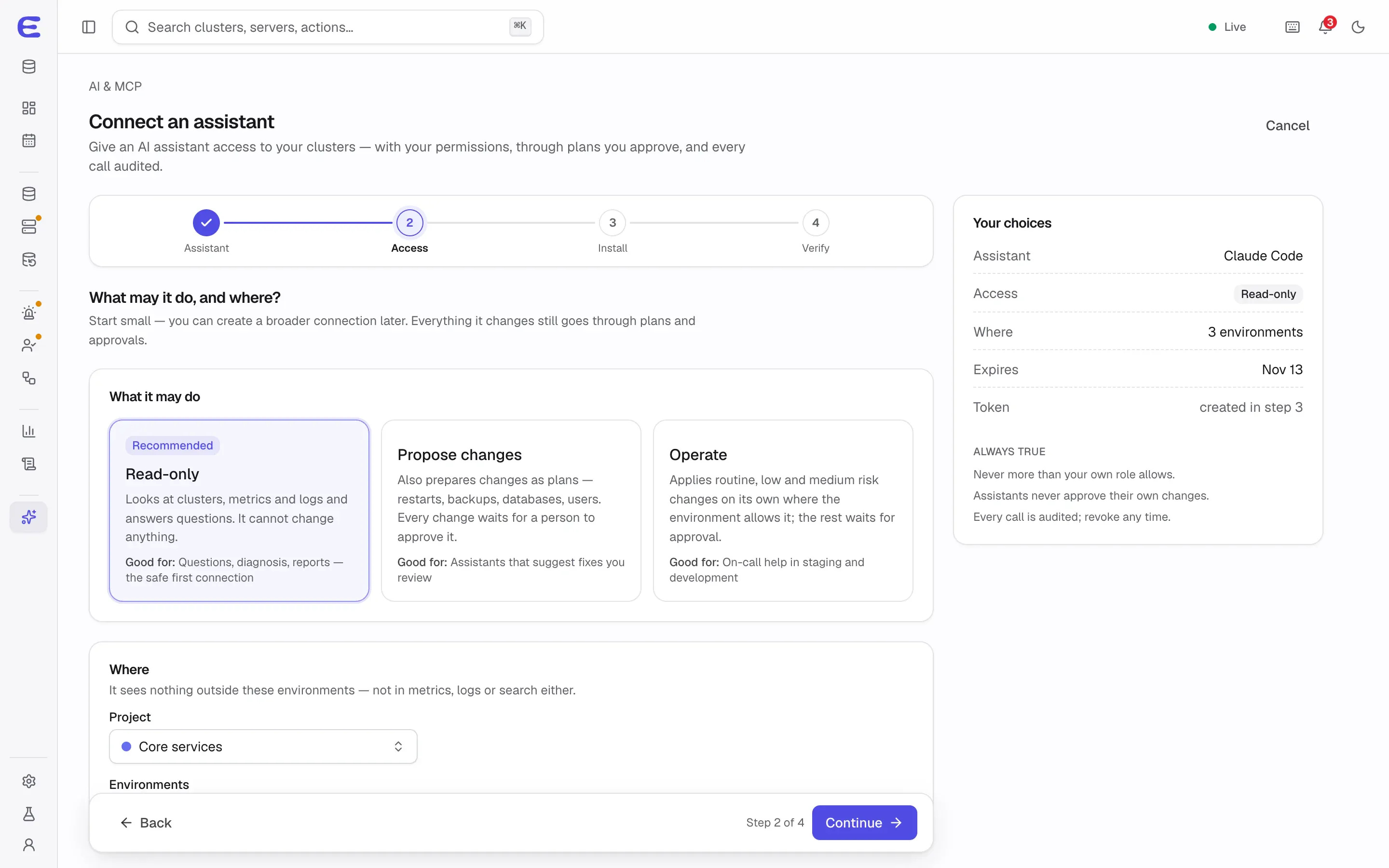
Connecting Claude Code: the access step, with read-only recommended.Interactive demo, simulated data.
Open this screen in the demo
What an assistant can do
The MCP server exposes tools to list and inspect clusters, read metrics, logs and events, diagnose a cluster
from its health report, run read-only queries, and prepare plans for changes. Every REST operation is reachable
through MCP as well, with identical permission checks, so an assistant can do whatever its token allows and
nothing more.
Typical requests:
“Why is orders-db slow this afternoon?”
“Add a replica to sessions in eu-1c and show me the plan.”
“Which clusters have restore drills overdue?”
“Prepare a minor upgrade for every staging PostgreSQL cluster.”
There is deliberately no tool for approving plans, no shell on the servers, and no way to obtain superuser or
system credentials.
Limits per environment
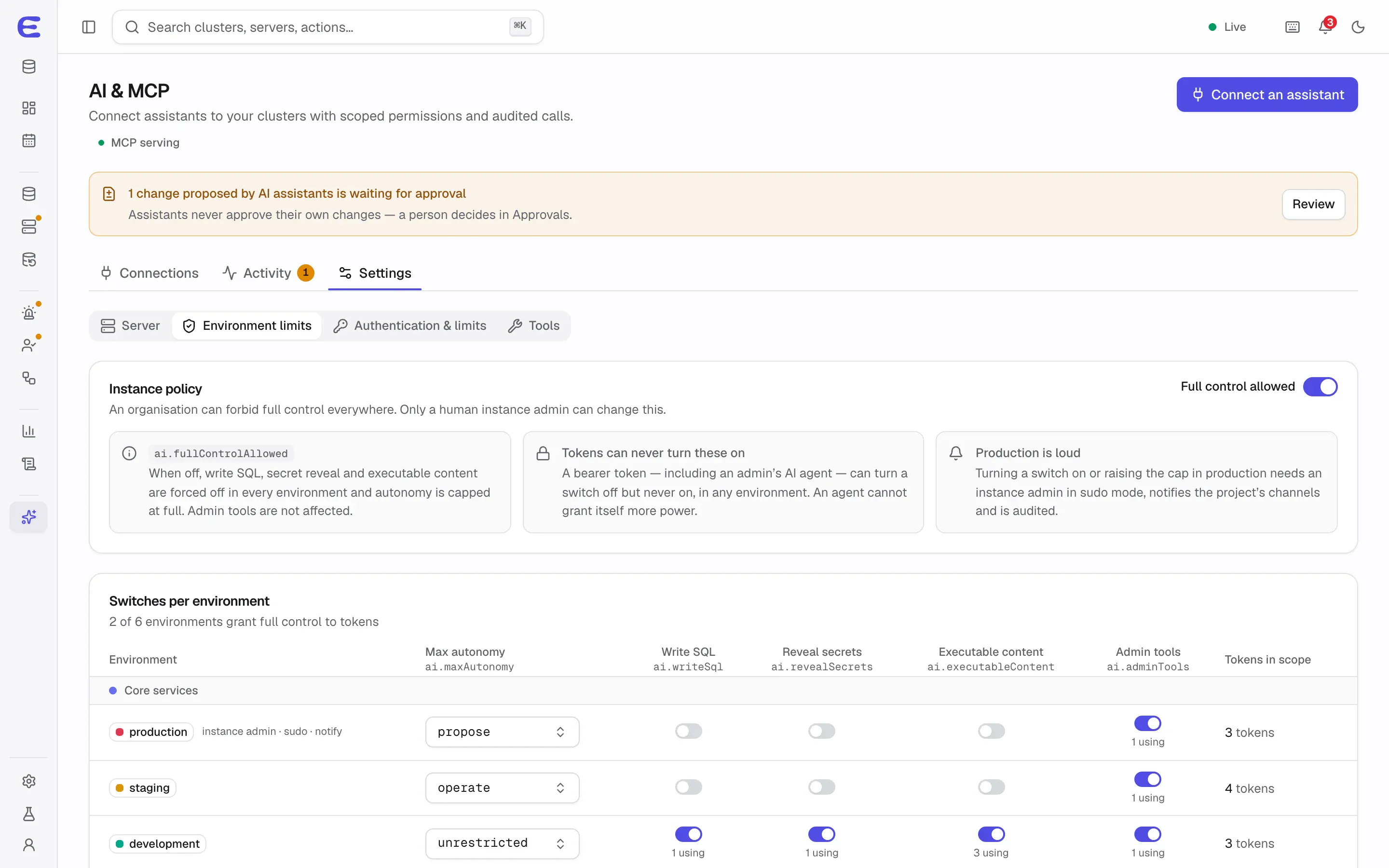
Each environment decides how far assistants may go, and a token’s effective level is the lowest of its own level,
the environment’s limit and the instance-wide limit. The defaults:
Setting
Production
Staging
Development
Most an assistant may apply on its own
Nothing (propose only)
Up to medium risk
Everything
Write SQL
Off
Off
On
Reveal secrets
Off
Off
On
Submit scripts and init files
Off
Off
On
Only people can turn these switches on. Turning one on in production takes an instance admin in sudo mode and
notifies the project. An instance admin can also forbid full control everywhere with one setting.
A token’s autonomy decides what it may apply without a person:
Level
What it allows
observe
Read only.
propose
Prepares plans; a person applies them. The default for new assistant tokens.
operate-low
Applies low-risk plans on its own.
operate
Applies plans up to medium risk.
full
Applies plans up to high risk; critical plans still need a person.
unrestricted
Applies anything the environment allows, still with confirmation for high and critical plans.
What always needs a person
Approving plans and approving new servers. Approvals are always human.
The owner of a token can never approve that token’s requests.
Granting elevated database privileges or loosening a production policy, at any autonomy level.
Sign-in and two-factor changes, turning deletion protection off, and emergency access.
Turning on full-control switches and the kill switches.
Built to contain mistakes and prompt injection
A prompt-injected or confused assistant is part of the threat model. Tool output is marked as untrusted, and no
output can cause a write by itself; containment comes from autonomy levels, policies and human approvals, not
from asking the model to behave.
Read-only means read-only: queries run on a replica under database roles that cannot write,
with a 5-second timeout and row limits. It is enforced by the database, not by parsing SQL.
Rate limits per token, such as 20 applies an hour and one cluster per plan, limit how much any
single token can change.
Kill switches: one stops every AI write instantly while reads continue; another closes the
MCP endpoint altogether.
Everything is audited, with an AI activity page that shows each call, its token and its result.
Tested against injection: an injection test suite must show that no write happens without a
plan and a policy decision.
Connecting an assistant
In the console, Connect an assistant walks through four steps: choose the assistant, choose its
access (read-only is recommended and preselected), install it, and verify that its first call arrives. It shows
the effective permissions per environment before the token exists. From the terminal, one command does the
same:
ecl mcp setup claude-code --preset read-only
Supported presets are read-only, propose, operate and
full-control, for claude-code, cursor, vscode,
codex and claude-desktop. Tokens expire after 30 days by default. Assistants
authenticate with a personal token in the first version; OAuth sign-in, needed for hosted connectors such as
claude.ai, is planned for v1.1.
Status
Personal access tokens with scopes, environment bindings and autonomy already exist in development builds. The
MCP server, assistant setup, limits and kill switches are planned for v0.3. In the
demo, the “AI agent requests a change” scenario sends a high-risk plan from
an assistant to the approvals inbox, where you can approve or reject it.
The interactive demo runs the whole console on simulated data. Trigger a failover, approve an AI assistant’s
plan, restore a backup to a point in time. Nothing to install.